 StreamyChat
Twitch chat client Windows Free beta
Your Twitch chat, finally yours.
One frameless, fully themeable window that replaces Twitch’s chat pop-out: several channels at once, moderation built in, and a look you actually choose.
What it does today
Built for streamers, not developers.
Everything is configured inside the app. No file to edit, no command line, no token to paste: sign in with Twitch and read your chat.
Several channels at once
In tabs you can drag: reorder them, move them to another window, or pull one out onto the desktop to give it its own window.
Full moderation
Timeout, ban, warn, delete, slow mode, followers-only, and a user card that tells you who you are about to sanction.
Third-party emotes
7TV, BetterTTV and FrankerFaceZ, global and per channel, animated ones included.
A window that gets out of the way
No frame, adjustable opacity, rounded corners, and a click-through mode that lets your clicks reach whatever is behind the chat.
A theme editor
Colours, fonts, density, sizes. Six themes come with it, and you can export yours as a file.
Your channel, out loud
Channel point redemptions, polls, predictions, hype trains, goals, ad breaks, shoutouts and new follows all show up in the chat.
Themes
Every colour is yours.
Six themes ship with it, and each one is a starting point rather than a fixed choice: pick the closest, then change whatever you want.
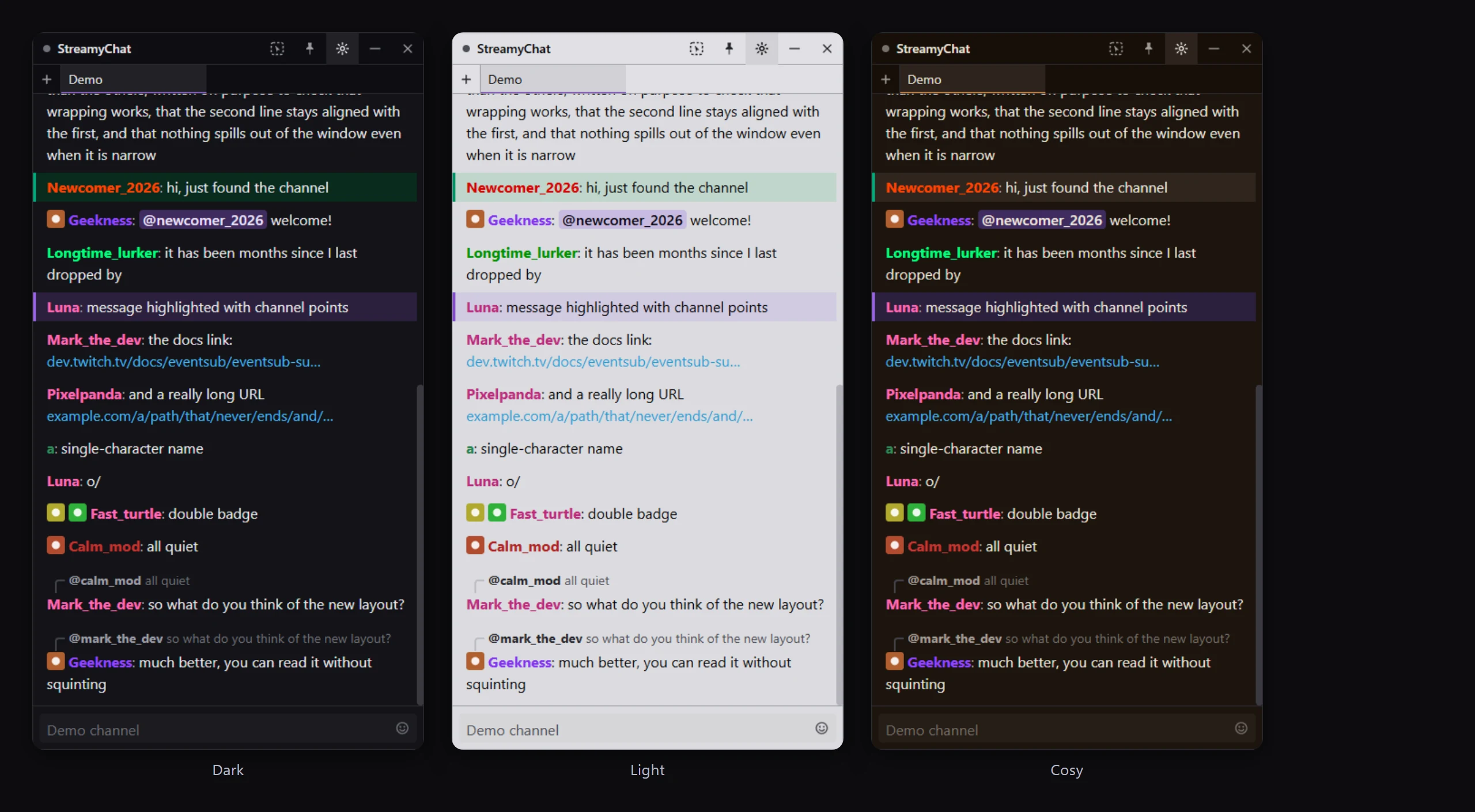
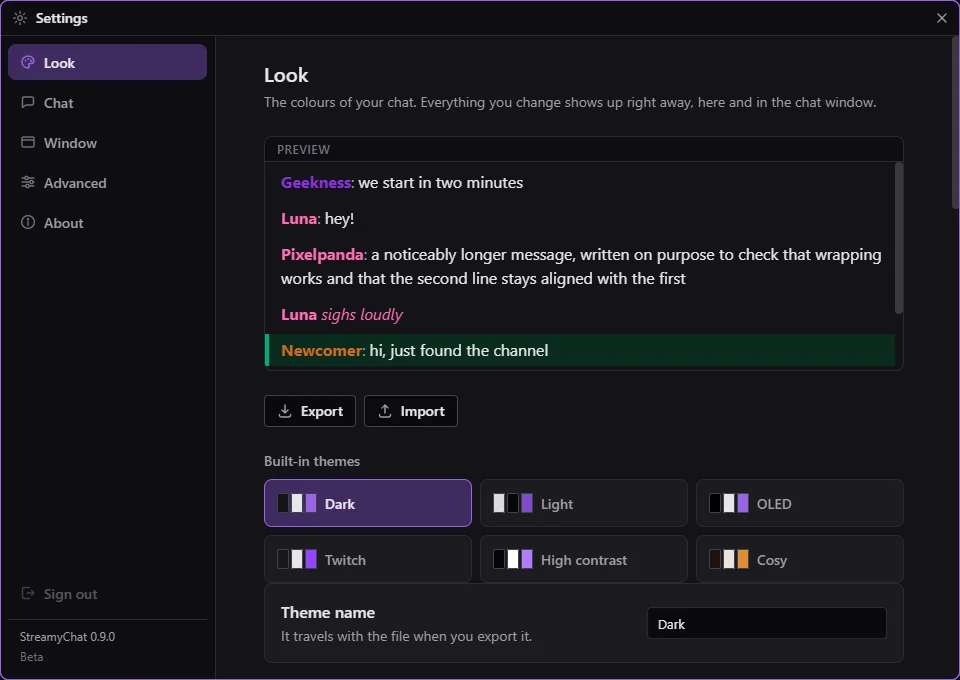
A theme is a file.
Export it, share it with your mods or your community, import someone else’s. Your chat looks like your stream, not like Twitch.
- Colours for every part of the window
- Fonts, sizes and density
- Opacity and rounded corners
- Export and import in one click
Free
Free today. Free for good.
Everything listed on this page stays free, permanently: the tabs, the moderation, the emotes, the theming, the transparent window, the channel events. That list is the promise, not a date.
Paid features are coming, as additions, never removals.
Saying so now rather than later: a paid edition, StreamyChat xD, is on its way. What it is meant to carry:
- Reading chat out loud, with a cleanup pass so that
hi evry1 hruis spoken as a sentence, not letter by letter. - Doing things when your viewers spend: triggering the app’s features from channel points, bits and donations.
No price, no tier, no date yet
Download
Get the beta.
It is a beta in active development, and also a working application: install it, sign in with Twitch, and read your chat. Things will change, and what ships today is here to stay.
Installer StreamyChat-Setup-x.y.z.exe
Start menu shortcut, clean uninstaller, and it updates itself. Take this one if you are not sure.
Portable StreamyChat-x.y.z-portable.exe
Installs nothing. Settings live in a folder next to the file: good for a USB stick or a shared machine.
Windows will probably warn you (“Windows protected your PC”), as it does for every program it does not recognise yet: click More info, then Run anyway. The app is not code-signed yet; every release publishes its SHA-512 checksum, served over HTTPS.
Something broken? Open an issue and attach the problem report (Settings, Advanced, Save the report). Your Twitch tokens are stripped out of it.
Questions
Good to know.
Is StreamyChat free?
Yes. Everything on this page is free, permanently. A paid edition, StreamyChat xD, will add extras later, such as reading chat out loud; it will never take away what is free.
Can I read several Twitch channels at once?
Yes. Each channel opens in a tab. Drag tabs to reorder them, move them to another window, or pull one out onto the desktop as its own window.
Is it an alternative to Twitch’s pop-out chat?
That is exactly what it replaces: the same chat, in a frameless window you can pin on top, make transparent, theme and click through, with several channels and moderation built in.
Is it an alternative to Chatterino?
Both are desktop Twitch chat clients that handle several channels. StreamyChat is built around the streamer’s window: frameless and themeable, click-through, with channel events such as redemptions, polls and hype trains right in the chat.
Do I have to give StreamyChat my Twitch password?
No. You sign in on twitch.tv, in your own browser, with a code the app shows you. StreamyChat never sees your password, and there is no API key or token to paste.
Does it support 7TV, BetterTTV and FrankerFaceZ emotes?
Yes, global and per channel, animated ones included.
Can I keep the chat on top of my game?
Yes. Pin the window on top, lower its opacity, and turn on click-through: your clicks go to the game behind the chat.
Does it work on Mac or Linux?
Not today: StreamyChat runs on Windows, 64-bit. The installer updates itself; a portable version installs nothing.